
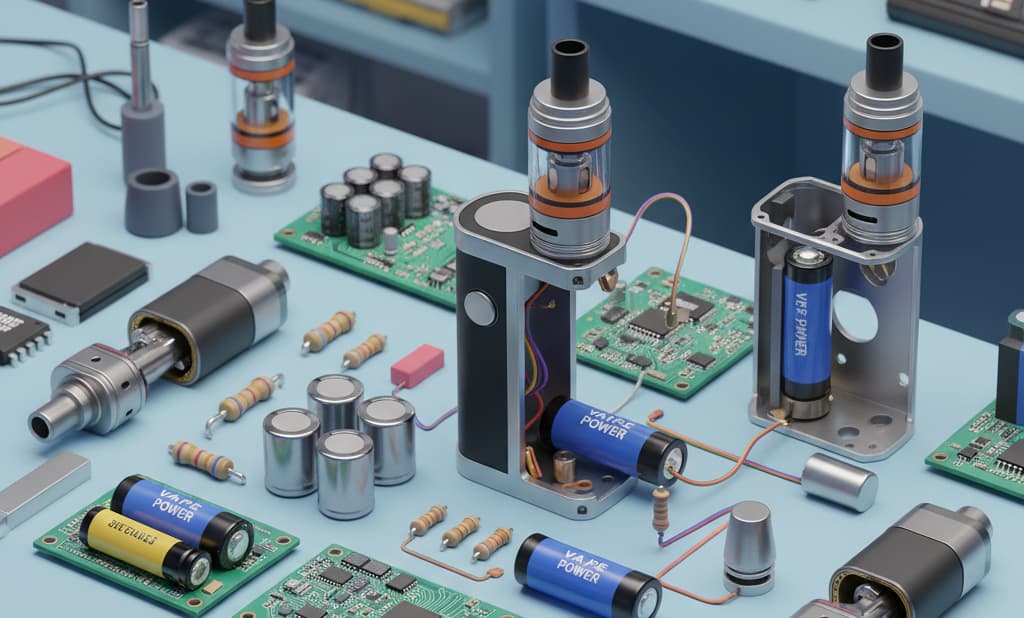
Understanding Vape Electrical Systems
Before diving into troubleshooting vape power issues and charging failures, it's essential to understand the core components that make up modern vaping devices' electrical systems.
Core Circuit Architecture
Modern vape devices integrate sophisticated electrical systems including:
Main Control Unit (MCU): Manages device operations, safety protocols, and user interface
Power Management IC (PMIC): Regulates voltage output and battery charging
Battery Protection Circuit: Prevents overcharge, over-discharge, overcurrent, and short circuit conditions
PWM Driver Circuit: Controls atomizer power delivery through pulse-width modulation
Sensor Array: Includes airflow sensors, temperature monitoring, and safety cutoffs
Complete Power Failure Diagnosis
When your vape device shows no signs of life, systematic diagnosis is crucial for identifying the root cause of power failures.
Symptom: Device completely unresponsive - no LED, no button response
Step-by-Step Power Failure Diagnosis
Battery Voltage Assessment
Tools needed: Digital multimeter
Measure battery voltage at terminals (should read ≥3.0V for lithium cells)
If voltage reads below 2.8V, battery may be in protective shutdown
Voltage below 2.5V indicates potentially damaged battery requiring replacement
Protection Circuit Reset
Safety Warning: Only perform if you have electronics experience
Disconnect device from all power sources
Wait 60 seconds for capacitors to discharge
Reconnect and attempt normal startup sequence
For devices with removable batteries, remove and reinsert after 30 seconds
Firmware Recovery Attempt
Many modern devices include recovery modes:
Try holding power button for 10-15 seconds
Attempt button combinations (varies by manufacturer)
Connect to computer while holding reset sequence
Check manufacturer's website for specific recovery procedures
Critical Safety Notice
Never attempt to bypass battery protection circuits or force-charge a completely dead lithium battery. This can result in thermal runaway, fire, or explosion. If basic recovery methods fail, seek professional repair or replace the device.
Device Powers On But No Vapor Production
This common issue indicates power delivery problems between the battery and atomizer, requiring systematic component testing.
Symptom: LED indicators work, battery shows charge, but no vapor when drawing
Power Delivery Diagnosis Process
Atomizer Connection Verification
Remove atomizer and inspect 510 threading for damage or debris
Clean connection points with isopropyl alcohol (91% or higher)
Check center pin alignment - should make solid contact
Verify atomizer is properly seated and hand-tightened
Resistance Testing
Equipment: Ohm meter or multimeter with resistance function
Measure atomizer coil resistance (typical range: 0.1-3.0Ω)
Reading above 5Ω indicates open circuit (broken coil)
Reading below 0.1Ω suggests short circuit - discontinue use immediately
No reading (infinite resistance) confirms coil failure
Airflow Sensor Testing
Check airflow holes for blockages or e-liquid residue
Test sensor response by covering/uncovering airflow while drawing
Try manual firing mode if device supports it
Clean sensor area with compressed air (electronics-safe)
Power Output Verification
Advanced testing: Requires oscilloscope or advanced multimeter
Measure voltage output to atomizer during firing
Check for proper PWM signal generation
Verify power MOSFET switching operation
Test current delivery under load conditions
Nominal lithium cell voltage
Fully charged lithium cell
Low battery cutoff point
Potential battery damage threshold
Comprehensive Charging System Troubleshooting
Charging issues represent a significant portion of vape electrical problems, ranging from complete charging failure to overheating during charge cycles.
Symptom: No charging response when connected to power source
Charging Failure Investigation
Charging Port Inspection
Examine USB port for physical damage, corrosion, or debris
Use compressed air to clear any pocket lint or dust
Check for bent or missing connector pins
Test port stability - loose connections prevent proper charging
Power Source Verification
Testing methodology:
Test charger output with multimeter (should read 5V ±0.25V)
Verify current capacity meets device requirements (typically 1A minimum)
Try different USB cables - data cables may limit charging current
Avoid computer USB ports for troubleshooting (limited to 500mA)
Internal Charging Circuit Testing
Advanced diagnosis: Requires electronics knowledge
Measure input voltage at charging IC (should match USB output)
Check charging current flow with ammeter (should show 0.05-1.0A)
Verify LED indicator circuit operation
Test temperature sensing circuit if device includes thermal management
Symptom: Extremely slow charging or charging stops prematurely
Slow Charging Resolution
Thermal Management Check
Monitor device temperature during charging (should remain below 40°C/104°F)
Ensure adequate ventilation around charging device
Remove protective cases that may trap heat
Charge in ambient temperatures between 10-35°C (50-95°F)
Cable and Connector Quality Assessment
Measure cable resistance (should be below 0.5Ω for both power and ground)
Test different high-quality USB cables
Ensure USB-C cables support appropriate power delivery protocols
Check for intermittent connection issues
Battery Condition Evaluation
Perform battery capacity test using appropriate equipment
Check internal resistance (increases with age/damage)
Monitor voltage during charging cycle
Replace battery if capacity drops below 80% of rated specification
Overheating During Charging: Critical Safety Issue
Device overheating during charging poses serious safety risks and requires immediate attention to prevent potential fire or injury.
Immediate Safety Protocol
If your device becomes hot during charging (above 45°C/113°F), immediately disconnect the charger, move the device to a safe location away from flammable materials, and allow it to cool completely before investigating the cause.
Overheating Investigation and Resolution
Emergency Safety Assessment
Check for battery swelling or case deformation
Smell for unusual odors (metallic, sweet, or acrid scents indicate danger)
Look for any visible damage, discoloration, or melting
If any abnormalities are present, discontinue use and dispose of safely
Charging Current Analysis
Measure actual charging current with ammeter
Compare against manufacturer specifications (typically 0.5-1.0A)
Excessive current indicates faulty charging IC or protection circuit
Use only manufacturer-approved chargers to prevent overcurrent
Heat Source Identification
Use infrared thermometer to locate hot spots
Check charging IC, battery area, and power regulation circuits
Verify proper thermal pathway design
Clean internal components if dust accumulation is blocking heat dissipation
Battery Life Degradation and Performance Optimization
Rapid battery life degradation often results from charging system malfunctions, usage patterns, or environmental factors affecting the lithium cell chemistry.
Battery Performance Recovery
Battery Calibration Process
Fully discharge device until automatic shutoff
Charge uninterrupted to 100% (avoid partial charging during calibration)
Repeat cycle 2-3 times to recalibrate battery management system
Monitor improvement in runtime and charging behavior
Optimal Charging Practices
Maintain charge level between 20-80% for daily use
Avoid overnight charging when possible
Use slow charging (0.5A) when time permits
Store device at 40-60% charge for extended periods
Environmental Optimization
Charge and store in temperatures between 10-25°C (50-77°F)
Avoid extreme temperature exposure during use
Maintain moderate humidity levels (40-60% RH)
Protect from direct sunlight and heat sources
Disposable Vape Specific Issues
Disposable vapes present unique troubleshooting challenges due to sealed construction and integrated battery systems designed for single-use applications.
Symptom: Brand new disposable device completely non-functional
New Disposable Activation
Packaging and Protection Removal
Check for protective stickers over airflow holes
Look for rubber caps or silicone plugs on mouthpiece
Remove any pull-tabs or activation strips
Inspect for shipping damage or leakage
Activation Sequence Testing
Try 5-10 firm draw activations
Check for button activation if device includes manual firing
Gently tap device to ensure internal connections
Verify device hasn't exceeded shelf life (check production date)
Quality Control Verification
Compare device weight to similar products (significantly light units may have battery issues)
Check for proper LED indicator function during draw
Verify airflow is not completely blocked
Contact retailer if device shows signs of manufacturing defect
Professional Diagnostic Tools and Equipment
Effective vape repair requires appropriate testing equipment to accurately diagnose electrical faults and charging system failures.
| Tool | Application | Measurement Range | Safety Requirements |
|---|---|---|---|
| Digital Multimeter | Voltage, current, resistance testing | 0-20V DC, 0-10A current | CAT II rated minimum |
| Oscilloscope | PWM signal analysis, switching circuits | 50MHz bandwidth minimum | Isolated inputs preferred |
| Battery Tester | Capacity, internal resistance measurement | 0.1-5.0V, 0-5000mAh | Overload protection required |
| Thermal Camera | Heat distribution analysis | -20°C to 150°C | Non-contact measurement |
| Power Supply | Controlled voltage/current testing | 0-6V, 0-3A adjustable | Current limiting essential |
Advanced Circuit Analysis and Firmware Issues
Modern vapes incorporate sophisticated firmware and protection circuits that may require advanced troubleshooting techniques when standard methods fail.
Firmware and Advanced Circuit Diagnosis
Firmware Recovery Procedures
Research manufacturer-specific recovery modes
Download official firmware updates from manufacturer websites
Use appropriate programming interfaces (USB, JTAG, SWD)
Verify firmware integrity before flashing
Protection Circuit Analysis
Test overcurrent protection threshold
Verify overvoltage and undervoltage cutoffs
Check thermal protection sensor calibration
Analyze protection circuit reset sequences
Signal Path Tracing
Map power distribution from battery to atomizer
Trace control signals from MCU to power MOSFETs
Verify sensor input conditioning circuits
Test communication buses between integrated circuits
Preventive Maintenance and Best Practices
Implementing proper maintenance procedures significantly reduces the likelihood of power system failures and extends device operational life.
Regular Maintenance Schedule
Weekly: Clean connection points, check for e-liquid leakage
Monthly: Deep clean airflow paths, inspect charging port
Quarterly: Battery performance test, firmware update check
Annually: Complete electrical safety inspection, battery replacement evaluation
Storage and Handling Guidelines
Store devices in temperature-controlled environments (15-25°C)
Maintain 40-60% battery charge for long-term storage
Protect charging ports from dust and moisture
Avoid mechanical shock and vibration during transport
Use original packaging for extended storage periods
When to Seek Professional Repair
Contact qualified repair services if you encounter:
Battery swelling or case deformation
Electrical burning odors or visible component damage
Persistent overheating during normal operation
Multiple failed DIY repair attempts
Devices still under manufacturer warranty
Health and Safety Advisory
Important Health Information: Vaping products contain nicotine, which is an addictive substance. Propylene glycol and vegetable glycerin, while generally recognized as safe for ingestion, have not been thoroughly studied for long-term inhalation effects. This guide is for educational purposes regarding device functionality and safety - it does not constitute medical advice. Consult healthcare providers regarding health impacts of vaping. Keep all vaping products away from children and pets. Nicotine exposure can be harmful to developing brains and pregnant individuals.
Professional Resources and References
This guide is based on engineering principles and industry standards including:
IEC 62133 standards for lithium battery safety
UL 8139 electrical safety standards for vaping devices
Industry best practices from IEEE and ASME guidelines
Manufacturer technical documentation and service manuals
Always consult official manufacturer documentation for device-specific procedures and safety requirements.
Final Health and Regulatory Notice
⚕️ Health Warning: This product contains nicotine. Nicotine is an addictive chemical. Vaping products have not been evaluated by the FDA as smoking cessation devices. Keep out of reach of children and pets. Not for use by minors, pregnant or nursing women, or individuals with heart conditions, high blood pressure, or diabetes. If you experience any adverse reactions, discontinue use immediately and consult a healthcare provider.
For a more comprehensive guide on vape malfunctions, please check out our blog: Complete Vape Troubleshooting Guide